MicroStrategy Custom user statistic
07 Feb 2026
Difficulty ★☆☆☆☆
Intro
Can we see user statistics in MicroStrategy without Platform Analytics?
The answer is yes - but
⚠️ Important limitation:
This method only works for datasets where MicroStrategy generates and executes SQL against the database.
It will not work for reports or dossiers based on Intelligent Cubes or cached results, because no SQL is executed in those cases - and without SQL, there is nothing to capture or analyze.
First, let’s create a table where we will store the captured data.
CREATE TABLE [Audit].[mstr_report_audit](
	[audit_id] [bigint] IDENTITY(1,1) NOT NULL,
	[ProjectName] [varchar](200) NOT NULL,
	[ReportQuid] [varchar](200) NULL,
	[ReportName] [varchar](50) NULL,
	[UserName] [varchar](200) NULL,
	[DateExecution] [int] NULL,
	[StartTime] [datetime2](7) NOT NULL,
	[EndTime] [datetime2](7) NULL,
	[IntelligenceServerJob] [int] NULL,
PRIMARY KEY CLUSTERED
(
	[audit_id] ASC
)WITH (PAD_INDEX = OFF, STATISTICS_NORECOMPUTE = OFF, IGNORE_DUP_KEY = OFF, ALLOW_ROW_LOCKS = ON, ALLOW_PAGE_LOCKS = ON) ON [PRIMARY]
) ON [PRIMARY]
GO

ALTER TABLE [Audit].[mstr_report_audit] ADD  DEFAULT (sysdatetime()) FOR [StartTime]
GO
‘audit_id’ is an auto-incrementing primary key, and ‘StartTime’ is populated automatically when the record is created.
In MicroStrategy, set the Report Pre Statement:
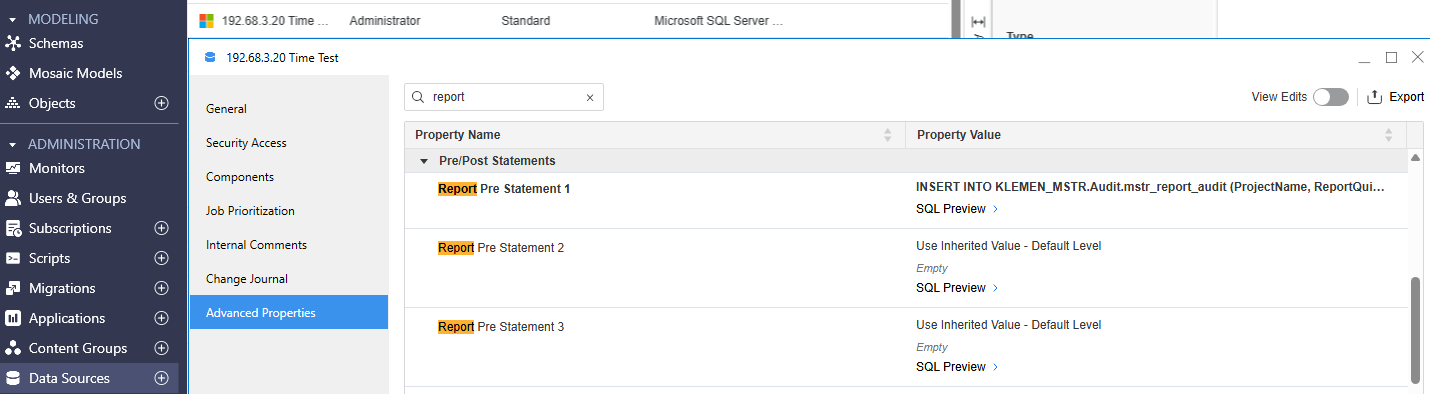
INSERT INTO KLEMEN_MSTR.Audit.mstr_report_audit (ProjectName, ReportQuid, ReportName, UserName, StartTime, DateExecution, IntelligenceServerJob)
VALUES ('!p', '!r', '!o', '!u', CURRENT_TIMESTAMP, !d , !j);
and also set ‘Report Post statement’
update KLEMEN_MSTR.Audit.mstr_report_audit
set EndTime = CURRENT_TIMESTAMP
where IntelligenceServerJob = !j
and DateExecution = !d
and ReportQuid = '!r'
The first statement creates a new row in the database when the report starts executing.
The second statement updates that same row with the time when the report finishes.
The captured data looks like this:

From this data, we can calculate the execution duration for each report run, see which users executed which reports, and analyze basic usage patterns.
If the amount of data grows over time, older records can be archived or moved to a separate table.
This won’t replace Platform Analytics, but it’s often good enough.
Additional info
For additional information, MicroStrategy supports inserting dynamic values into SQL statements using special syntax. You can insert the following tokens into strings to populate runtime information from the SQL Engine:
You can insert the following syntax into strings to populate dynamic information by the SQL Engine: Customizing_SQL_statements_Pre_Post_Statements
Below is a reference list of MicroStrategy substitution variables that can be used in Pre- and Post-Statements.
!!! inserts column names, separated by commas (can be used in Table Pre/Post and Insert Pre/Mid statements).
!! inserts an exclamation (!) (can be used in Table Pre/Post and Insert Pre/Mid statements). Note that "!!=" inserts a not equal to sign in the SQL statement.
??? inserts the table name (can be used in Data Mart Insert/Pre/Post statements, Insert Pre/Post, and Table Post statements).
;; inserts a semicolon (;) in Statement5 (can be used in all Pre/Post statements). Note that a single ";" (semicolon) acts as a separator.
!a inserts column names for attributes only (can be used in Table Pre/Post and Insert Pre/Mid statements).
!d inserts the date (can be used in all Pre/Post statements).
!f inserts the report path (can be used in all Pre/Post statements except Element Browsing). An example is: \MicroStrategy Tutorial\Public Objects\Reports\MicroStrategy Platform Capabilities\Ad hoc Reporting\Sorting\Yearly Sales
!i inserts the job priority of the report which is represented as an integer from 0 to 999 (can be used in all Pre/Post statements).
!o inserts the report name (can be used in all Pre/Post statements).
!u inserts the user name (can be used in all Pre/Post statements).
!j inserts the Intelligence Server Job ID associated with the report execution (can be used in all Pre/Post statements).
!r inserts the report GUID, the unique identifier for the report object that is also available in the Enterprise Manager application (can be used in all Pre/Post statements).
!t inserts a timestamp (can be used in all Pre/Post statements).
!p inserts the project name with spaces omitted (can be used in all Pre/Post statements).
!z inserts the project GUID, the unique identifier for the project (can be used in all Pre/Post statements).
!s inserts the user session GUID, the unique identifier for the user's session that is also available in the Enterprise Manager application (can be used in all Pre/Post statements).